
YouTube
Google LLCVideo Players & Editors
3.82.99M Reviews
- Version
- Varies With Device
- Installs
- 10.00B
- Age Rating
- Teen
Screenshots
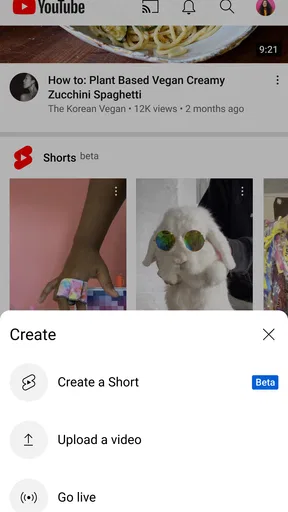


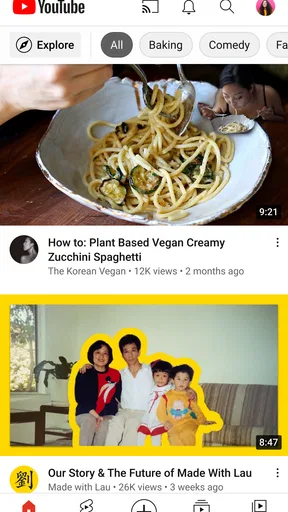
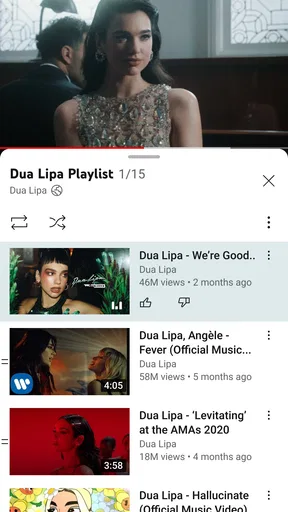
Our Review of YouTube
 Analysis by Appyee
My most reliable way to use YouTube is to treat it less like a channel I leave running and more like a set of small viewing tools: search when I know what I want, subscriptions when I want familiar creators, and recommendations when I have time to browse. That simple distinction makes a big difference. The app can be a quick answer machine, a learning shelf, or a rabbit hole, and I get a better experience when I decide which one I need before opening it.
A routine that keeps viewing purposeful
For a specific task, I start with search rather than scrolling the Home feed. If I’m trying to fix something, learn a movement, or compare two products, a focused query gets me closer to useful videos and makes it easier to judge whether a result actually addresses my question. I’ll often save a promising video to a playlist so I can return to it without relying on the app to recommend it again.
For everyday entertainment, the Subscriptions tab is a calmer starting point than a broad recommendation feed. It gives me a practical way to catch up with channels I chose intentionally. I still browse Home when I’m curious, but separating those habits helps me avoid opening the app for one clip and emerging much later with no idea how I got there. Shorts suit brief idle moments; they are less useful when I want sustained attention or a detailed explanation.
Small settings and habits worth checking
I recommend checking playback quality when a video looks unexpectedly soft or when mobile data matters. The automatic choice is convenient, but it may not match the connection or screen I’m using at that moment. Captions are another useful control: I turn them on in noisy places, and they can help when I want to follow speech without raising the volume. Their usefulness depends on the video, so I don’t assume every caption track will be equally clear.
Queueing and playlists solve different problems. A queue is handy when I have a short run of videos to watch now, while a playlist works better for a topic I expect to revisit. For example, I might queue a few talks for a break, then keep a separate playlist of cooking lessons for the next time I’m in the kitchen. This small distinction saves me from repeatedly searching for the same material.
Where it fits among video apps
As a free video player and editor app from Google LLC, YouTube combines creator channels, short clips, live content, and a huge searchable catalog in one place. Its scale is reflected in an average rating of 3.9 from around 171 million ratings and more than 10 billion installs. It is rated Teen, released on October 20, 2010, and remains free to install, with in-app purchases ranging from a few cents to nearly a thousand dollars per item. The app’s breadth is its clearest advantage over a subscription streaming service built around a smaller, selected catalog; those services can be a better fit when I want a carefully organized set of films or series rather than user-uploaded variety.
That breadth also means quality and presentation vary from channel to channel. Search can surface several versions of an answer, and a polished thumbnail is not proof that a video is accurate or useful. I check the explanation, creator context, and any relevant details before relying on advice for a repair, health question, or purchase. For a topic where correctness matters, I use YouTube to discover explanations, then verify important claims with a dependable source.
When I would choose something else
YouTube is a strong choice for discovering creators, following interests, and learning from demonstrations, but it is not always the best tool. If I want a film with consistent production and a predictable viewing path, a dedicated streaming service is usually less distracting. If I only need to play files stored on my device, a local media player is simpler and avoids the recommendation-and-channel experience altogether. And if autoplay or endless scrolling tends to pull me away from work, I set a clear stopping point before I start rather than expecting the app to make that choice for me.
People often ask whether the app is free: yes, installing and using it does not require an upfront payment, while optional purchases and paid offerings are separate choices. They also wonder whether it works for quick viewing or longer sessions; it handles both, but I find it most satisfying when I choose a destination first. For travel, check the available offline options before leaving, since downloads are associated with YouTube Premium in the app experience described here. For a noisy commute, captions and headphones can make a tutorial easier to follow, though neither can fix unclear audio or poor captions.
There is a learning curve to getting value from the recommendations. I use search and subscriptions to establish what I actually want to watch, then let Home introduce me to adjacent subjects when I have time. That approach is more dependable than treating every suggestion as a personal instruction. The app is especially useful for people who enjoy exploring many kinds of video and are willing to curate their own viewing; someone who wants a tightly controlled, ad-free catalog may prefer a paid alternative.
First Impressions and Interface
When you first open up YouTube, you’re greeted by a clean and user-friendly interface. The homepage is a blend of personalized recommendations and trending videos, thanks to its smart algorithm. It’s like having a personal assistant who knows exactly what you might want to watch next. Navigating through the app is a breeze, with a bottom menu that includes Home, Shorts, Subscriptions, and Library. Each section is intuitively designed, making it easy for anyone to jump right in.
Content Galore
If there’s one thing YouTube does exceptionally well, it’s providing a platform for an endless array of content. From DIY tutorials to live gaming streams, and educational channels to music videos, there’s no shortage of things to explore. The diverse range of content creators means you’re always just one search away from discovering something new and exciting. Plus, with the introduction of YouTube Shorts, you can enjoy quick, snappy content perfect for those short attention spans.
Personalization and Recommendations
One of the standout features of YouTube is its ability to personalize your viewing experience. The more you watch, the better it gets at recommending videos you’ll love. It’s like magic! Whether you’re into tech reviews, comedy skits, or cooking shows, YouTube has got your back. This level of personalization keeps users coming back for more, as there’s always something fresh and relevant waiting for you.
Offline Viewing and YouTube Premium
For those who want to take their viewing experience to the next level, YouTube Premium offers some appealing perks. Ad-free viewing is just the tip of the iceberg. You also get the ability to download videos for offline viewing, which is a lifesaver for those long flights or commutes. Plus, access to YouTube Music comes as a bonus, turning your app into a one-stop-shop for entertainment.
Community and Interaction
YouTube isn’t just about passive watching; it’s a community hub where viewers and creators can interact. The comment section, while sometimes a wild place, offers a space for discussion and connection. Creators can engage with their audience through live chats and community posts, making it a more interactive experience than traditional TV.
In conclusion, YouTube remains a powerhouse in the app world for a reason. Its combination of vast content, smart personalization, and community features make it a must-have on any smartphone. Whether you’re unwinding with a funny cat video or learning a new skill, YouTube has got you covered. So, go ahead, open the app, and see where the algorithm takes you today!
Privacy and Permissions
See what permissions an app requests and how it handles your data.
- Identity
- find accounts on the device, add or remove accounts
- Contacts
- find accounts on the device, read your contacts
- Location
- approximate location (network-based), precise location (GPS and network-based)
- Phone
- read phone status and identity
- Photos/Media/Files
- read the contents of your USB storage, modify or delete the contents of your USB storage
- Storage
- read the contents of your USB storage, modify or delete the contents of your USB storage
- Camera
- take pictures and videos
- Microphone
- record audio
- Wi-Fi connection information
- view Wi-Fi connections
- Device ID & call information
- read phone status and identity
- Other
- view network connections, measure app storage space, full network access, change your audio settings, control Near Field Communication, run at startup, draw over other apps, use accounts on the device, control vibration, prevent device from sleeping, read Google service configuration
How YouTube Compares
Full ComparisonChoose YouTube for the broadest mix of videos, BiliBili for anime and licensed titles, or Kwai for short-form creation, effects, and social sharing.
| App | Developer | Rating | Price |
|---|---|---|---|
 YouTubeThis App | Google LLC | 3.8 | Free |
 BiliBili -HD Anime, Videos | BALABOOM PTE. LTD. | 3.7 | Free |
 Kwai - Video & Drama | Joyo Technology Pte Ltd | 4.0 | Free |
Verdict
Strengths of YouTube
- Wide variety of content across genres.
- User-friendly interface and navigation.
- High-quality streaming options available.
- Supports offline viewing with Premium.
- Regular updates and new features.
Limitations of YouTube
- Ads can be intrusive without Premium.
- Some videos are region-restricted.
- Comments can be toxic and unmoderated.
- Content quality varies significantly.
- Requires stable internet for streaming.
Other Releases by Google LLC
View All
Google Calendar
Productivity4.6

Google Messages
Communication4.6

Tools4.0

Google TV
Video Players & Editors3.9
Similar Picks in This Category
View AllGoogle TV
Google LLC3.9

iTunes
Apple4.7

MX Player
Amazon Mobile LLC4.2

CapCut - Video Editor
Bytedance Pte. Ltd.3.5

PLAYit-All in One Video Player
PLAYIT TECHNOLOGY PTE. LTD.4.5

VivaVideo - Video Cut & Editor
QuVideo Inc. Video Editor & Video Maker App4.3
You May Also Like
View All


Frequently Asked Questions
What is YouTube, and how can I use it on my mobile device?
YouTube is a popular video-sharing platform where users can watch, upload, and share videos. On mobile devices, you can use the YouTube app, available on both Android and iOS. Simply download it from the Google Play Store or App Store, sign in with your Google account, and start exploring a vast collection of videos across various genres.
Is YouTube free to use, or are there any subscription options?
YouTube is free to use, allowing users to watch and upload videos without any cost. However, it also offers a premium subscription called YouTube Premium, which provides ad-free viewing, offline downloads, and access to YouTube Music for a monthly fee. This subscription enhances the overall user experience, especially for frequent users.
How does YouTube handle privacy and data security for its users?
YouTube prioritizes user privacy and data security by implementing various measures. Users can control their privacy settings, such as managing their watch and search history. YouTube’s policies comply with global data protection laws, and they provide users with transparency about data collection and use, ensuring a secure environment for content consumption and sharing.
Can I use YouTube to upload my own content, and what are the requirements?
Yes, YouTube allows users to upload their own content. To do so, you need a Google account and must comply with YouTube’s Community Guidelines and copyright policies. Videos can be uploaded directly from the mobile app or via a web browser. Ensure your content adheres to quality standards and does not violate any terms to avoid removal.
How can I optimize my YouTube experience on mobile devices?
To optimize your YouTube experience on mobile, ensure you have a stable internet connection for smooth streaming. Customize your feed by subscribing to channels and using the ‘Library’ feature to organize your playlists. Explore YouTube’s settings to adjust video quality, enable captions, and manage notifications for an enhanced, personalized viewing experience.
